

Running a successful Amazon business goes beyond good products and competitive pricing—your seller account health determines whether you continue selling or face suspension. With Amazon becoming more strict in 2025, even small policy violations can put your account at risk.
In this guide, we’ll cover:
✅ What causes Amazon seller account suspension
✅ How to protect your account from deactivation
✅ Key Account Health metrics every seller must monitor
✅ Tips to maintain a strong Account Health Score
✅ Best practices followed by top sellers
Let’s dive in.
1) Why Amazon suspends seller accounts — detailed definitions & examples
Order Defect Rate (ODR)
Definition: Percentage of orders that have a “defect” — typically negative feedback, A-to-Z Guarantee claims, or chargebacks.
Why it matters: Amazon uses ODR as a core proxy for customer satisfaction. A high ODR signals recurring problems (bad product, shipping or service).
How it’s measured (conceptually):
ODR = (Number of orders with defects) ÷ (Total orders in period) × 100%
Example defects: negative reviews complaining of counterfeit product, an A-to-Z claim for “item not received,” or a buyer’s credit card chargeback.
Actionable: Investigate each defect, reply with evidence (tracking, invoices), fix root cause (packaging, supplier), and request Amazon to remove invalid claims with proof.
Policy Violations
Definition: Any breach of Amazon’s rules — these vary by topic: product restrictions, prohibited items, misleading listings, review manipulation, and more.
Why it matters: Amazon enforces policies to keep buyers safe and preserve marketplace integrity. Repeated or severe violations → immediate suspension.
Examples: selling regulated items (like certain health devices) without required approvals, using false “made in” claims, or listing counterfeit goods.
Actionable: Read category-specific rules before listing; keep supplier invoices, certifications and batch records ready.
Late Shipment Rate (LSR)
Definition: Percentage of orders shipped after the expected ship-by date (or delivered late when you control shipping).
Why it matters: Late deliveries hurt customer experience and increase refunds/returns.
How measured: Amazon compares your ship/delivery times to promised times. For sellers using FBA, Amazon handles this and LSR usually improves.
Thresholds: Amazon often expects LSR under 4% (policies can change).
Actionable: Use reliable couriers, set realistic handling times, and use ship-by reminders and buffer days.
Cancellation Rate (CR)
Definition: Percentage of orders cancelled by the seller before fulfillment.
Why it matters: Cancellations mean a poor buying experience and lost trust.
How measured: CR = (Seller-cancelled orders) ÷ (Total orders) × 100%
Thresholds: Commonly monitored; Amazon flags rates above ~2.5% (may vary).
Actionable: Sync inventory in real-time, use safety stock, avoid overselling, and automate order routing to prevent cancellations.
Intellectual Property (IP) Complaints
Definition: Complaints filed by rights-holders claiming trademark, copyright or patent violations.
Why it matters: IP complaints often lead to immediate listing removal or account suspension because they involve legal claims.
Examples: A brand reports a listing as counterfeit or unauthorized.
Actionable: Keep supplier authorization letters, invoices, and brand authorization; enroll in Brand Registry if you’re the brand owner.
Review Manipulation
Definition: Any attempt to influence reviews artificially (fake reviews, reward-for-review, review swaps).
Why it matters: Fake reviews skew trust and Amazon penalizes sellers who manipulate reviews — listing takedowns, account restrictions.
Actionable: Encourage honest reviews using Amazon’s official “request a review” button or approved follow-up messages. Don’t offer discounts or ask for positive-only reviews.
Poor Customer Experience (general)
Definition: Any combination of late shipping, wrong product, poor packaging, long response times, misleading listings, or frequent returns.
Why it matters: It increases returns, negative feedback, A-to-Z claims — all count against your ODR and account health.
Actionable: Audit every buyer touchpoint (listing → checkout → shipping → returns) and fix recurring complaints.
2) How to protect your account from deactivation — each tip explained
1. Follow Amazon Selling Policies Strictly
Meaning: Policies are the rules Amazon sets (content rules, product restrictions, packaging, safety, customer communication).
Why: Not following = immediate risk.
How to act: Bookmark Seller Central Help, subscribe to policy updates, use Amazon’s category-specific guidelines before listing. Keep documentation (invoices, lab reports) for every SKU.
2. Maintain authentic & high-quality listings
Meaning: Titles, bullets, images and descriptions must be accurate and truthful.
Why: Misleading listings cause negative reviews and A-to-Z claims.
How to act: Use correct dimensions, accurate claims (no “cures”), high-resolution images without misleading overlays, and consistent product identifiers (UPC/GTIN).
3. Keep your metrics green (monitor proactively)
Meaning: Continuously watch ODR, LSR, CR, RDR and other performance metrics on Seller Central’s dashboards.
Why: Small problems show up here first.
How to act: Set internal weekly checks, create alerts when metrics breach soft thresholds (e.g., ODR > 0.6% start investigating before it hits 1%).
4. Deliver products on time
Meaning: Meet or beat promised ship-by and delivery dates.
Why: Prevents negative feedback and A-to-Z claims.
How to act: Use carriers with good on-time rates, buffer holidays/high-demand windows, use Amazon FBA for Prime-eligible fast delivery.
5. Manage inventory smartly
Meaning: Keep accurate stock counts, avoid stockouts and overselling.
Why: Stockouts cause cancellations; overselling leads to CR.
How to act: Use inventory software, apply reorder point formula (lead time × average sales + safety stock), and schedule frequent audits.
6. Avoid review manipulation
Meaning: Don’t pay-for or coerce reviews; don’t ask for positive-only feedback.
Why: Violating the reviews policy is serious.
How to act: Use Amazon’s “Request a Review” and neutral follow-up messages; focus on product quality & customer service so reviews are earned.
7. Respond to complaints quickly
Meaning: Reply fast to buyer messages, A-to-Z inquiries, and Amazon’s performance notices.
Why: Quick resolution reduces escalation and the chance Amazon suspends for unresolved issues.
How to act: Aim to respond to buyer messages within 24 hours; respond to Amazon performance notices within the timeframe Amazon gives (often 24–48 hours). Have templates ready but always attach relevant evidence.
8. Use professional account management services (if scaling)
Meaning: Hire or subscribe to experienced teams/tools that manage compliance, listing optimization, and performance monitoring.
Why: As volume grows, manual monitoring fails — professionals reduce mistakes and maintain best practices.
How to act: Vet agencies on experience, ask for case studies of reinstatements, check for transparency in actions they perform.
3) Account Health metrics — deep definitions & how Amazon uses them
Order Defect Rate (ODR) — deep dive
-
Components counted: Negative feedback, A-to-Z claims, credit card chargebacks.
-
Timeframe: Usually a rolling 30-day or 60-day window in Seller Central.
-
Amazon action: Warnings, restrictions, or suspension if above threshold.
-
Prevention: Improve product quality, faster shipping, accurate listings, and quick customer service.
Late Shipment Rate (LSR) — deep dive
-
Measured by: Percentage of orders marked shipped after the expected ship date or delivered late when you set delivery promise.
-
Seller types: Sellers using FBA will see very low LSR because Amazon controls fulfillment. For FBM (Fulfilled by Merchant), LSR is fully on you.
-
Prevention: Realistic handling times, daily order processing, and partnering with reliable couriers.
Cancellation Rate (CR) — deep dive
-
Types of cancellations counted: Seller-cancelled orders due to stock-outs or inability to ship. Buyer-initiated cancellations (before you ship) usually do not count as seller failures.
-
Prevention: Real-time stock sync (if you sell on multiple channels), safety stock, reliable fulfillment routes.
Voice of Customer (VOC) / Returns Dissatisfaction Rate (RDR)
-
VOC: Amazon’s aggregate of customer sentiment — returns, feedback, A-to-Zs combined and converted into ratings by product.
-
RDR: Measures how satisfied buyers are with returns — were returns handled well? Were refunds timely?
-
Prevention: Clear return policies, accurate listings to reduce wrong expectations, fast refunds.
Policy Compliance Score
-
Definition: A normalization of policy adherence across your account (how often you flout rules).
-
Tracked items: Listing accuracy, prohibited products, product safety complaints.
-
Action: Continual audits, training staff on rules, and keeping documents for every product batch.
Intellectual Property Complaints
-
Outcome: Can lead to immediate listing removal or account action.
-
Defense evidence: Invoices, authorization letters, Brand Registry enrollment, images of supply chain.
-
Prevention: Only source from authorized suppliers; have paperwork for every SKU.
4) How to maintain excellent account health — elaborate actions & examples
Maintain excellent product quality
-
What to do: Perform incoming quality inspections, sample checks every lot, and test claims (e.g., safety tests for electronics).
-
Example: If you import garments, inspect seam strength and dimensions for a random sample of 50 units each shipment.
Improve packaging
-
What to do: Use appropriate cushioning and correct box size to avoid transit damage. Add “Fragile” or “Do not bend” where required.
-
Example: Ship glass items with double-cushioning and a “bottom pad” and “top pad” to prevent damage.
Respond to buyer messages within 24 hours
-
Why 24 hours: Fast replies reduce negative feedback and A-to-Z claims. Amazon monitors response times for policy adherence.
-
How: Use auto-acknowledgement then follow up with personal resolution. Keep canned replies for common issues but personalize.
Reduce returns with better listings
-
What to fix: Provide exact specs, multiple product images, size charts, and instructional videos if needed.
-
Example: For shoes, include a centimeters-based size chart and a photo showing shoe measurements.
Use Amazon tools (Account Health Dashboard, Brand Registry, FBA)
-
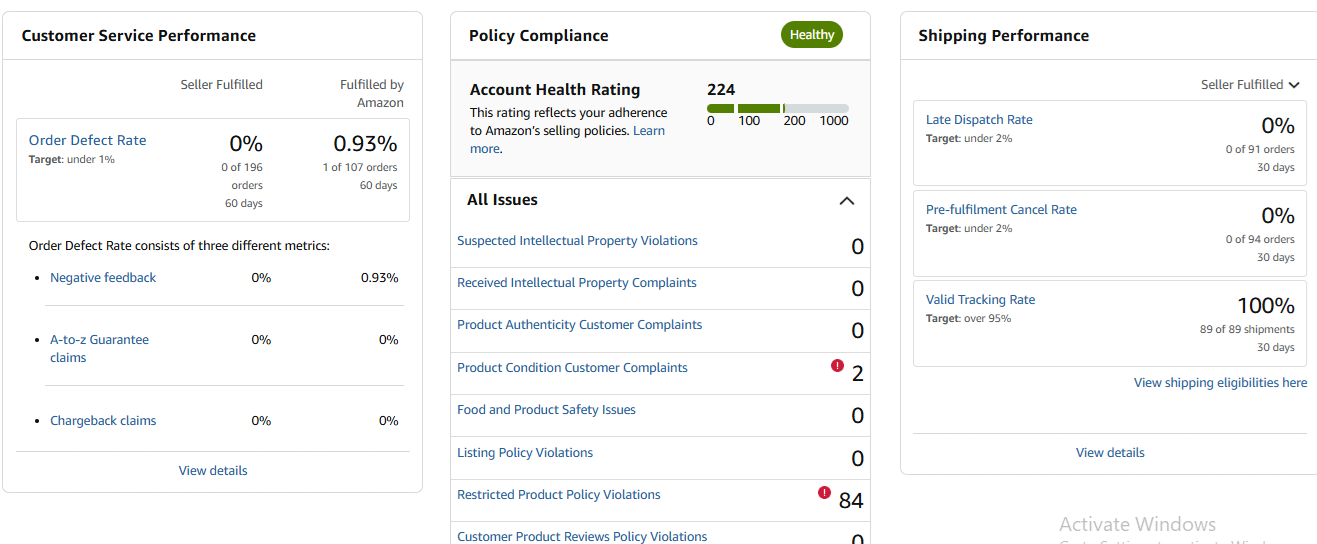
Account Health Dashboard: Your control center — check it daily for warnings and take immediate actions on flagged issues.
-
Brand Registry: If you own a brand, enroll to gain tools to fight counterfeit and request IP takedowns.
-
FBA: Offloads shipping responsibility to Amazon, generally improving shipping metrics and customer trust.
Stay updated with policy changes
-
How: Monitor Seller Central announcements, join Amazon seller forums, and follow official newsletters. Schedule a monthly policy review meeting internally.
Solve issues before they escalate
-
What to do: When you get a policy warning, don’t ignore it. Investigate root cause, create corrective actions, document steps you took, and submit a clear Plan of Action (POA) to Amazon if required.
-
Plan of Action should include: root cause, corrective actions taken, and preventive measures for the future (with timelines and evidence).
5) Practical templates & examples (short)
Example: Quick POA outline (when Amazon issues a suspension)
-
Root cause — E.g., “We sold an expired product due to a faulty inventory flagging process.”
-
Corrective actions taken — E.g., “We removed all affected SKUs, refunded affected buyers, and replaced the items where necessary.” (Attach invoices & refunds proof.)
-
Preventive actions — E.g., “We implemented a new 3-step inventory check, barcode audits every shipment, and supplier QA certificates required for every restock.”
6) Simple inventory reorder formula (actionable, step-by-step)
If you want a basic Reorder Point (ROP) formula you can use:
ROP = (Average daily sales × Lead time in days) + Safety stock
-
Step 1: Calculate average daily sales (sum sales in a period ÷ number of days).
-
Step 2: Multiply by lead time (supplier shipping + customs time).
-
Step 3: Add safety stock (extra units to cover variability).
Example (digit-by-digit):
-
Average daily sales = 12 units/day
-
Lead time = 10 days
-
Safety stock = 50 units
ROP = (12 × 10) + 50 = 120 + 50 = 170 units — reorder when inventory hits 170.
7) Ongoing monitoring checklist (use daily/weekly as needed)
Daily
-
Check “Messages” and respond within 24 hours
-
Review any new negative feedback or A-to-Z claims
Weekly
-
Check Account Health Dashboard metrics (ODR, LSR, CR)
-
Audit top-selling SKUs for listing accuracy
Monthly
-
Supplier audit and invoice checks
-
Inventory reconciliation, forecast next month demand
-
Review policy updates from Seller Central
Quarterly
-
Full account health audit (logs, documentation, POAs)
-
Consider third-party compliance tool or consultant
8) When you receive a performance notification from Amazon — step-by-step
-
Read the notice carefully — note the specific metric/issue and deadline.
-
Gather evidence — order IDs, tracking, invoices, screenshots.
-
Create a concise POA (root cause → fixes taken → long-term prevention).
-
Submit via Seller Central with attachments.
-
Follow up regularly and be polite and factual with Amazon appeals.
Final quick-reference cheat-sheet
-
Keep ODR < 1%, LSR < 4%, CR < 2.5% (use as targets, verify exact thresholds in Seller Central).
-
Respond to buyers within 24 hours.
-
Keep invoices and supplier documentation for every SKU.
-
Use FBA if shipping performance is a challenge.
-
Don’t manipulate reviews — use Amazon’s tools.
-
If suspended, submit a clear POA with evidence.
⭐ Final Thoughts
Protecting your Amazon seller account from suspension is completely possible with the right strategies. By understanding Amazon’s Account Health Matrix, following policies, and delivering a great customer experience, you can maintain a healthy, profitable, and long-term Amazon business.